
Adding Youtube videos in Joomla 1.7 (clearing filters from editors)

August 25, 2011
By

Sort of gave the trick in the title. Inserting Youtube videos in Joomla 1.6 or Joomla 1.7 (sort of our flag systems along with WordPress), the only thing that needs to be done is clear all the filters from the content editors on the articles manager options. So, if the filters get in the way of adding videos, why are they on to begin with? Filters prevent adding malicious or damaging code into the articles of the Joomla website as well as ensuring the output of the code from the WYSIWYG editors is as clean as possible. However, for advanced users or when there are not many administrative users, the filters tend to get in the way.

So, if you want to add a video from Youtube, Vimeo, Viddler or even Facebook (see the trick to adding Facebook videos), it is necessary to eliminate the filters from the editors.

Embedding videos in Joomla requires a plugin, module or component and that is the method used in Joomla 1.5 series, however, for Joomla 1.6/1.7 there are still no good add-ons that enable this functionality in a simple way. So, for now, to embed videos the next steps need to be followed.

1. Turn off the WYSIWYG editor from the Global Configuration on the Dashboard

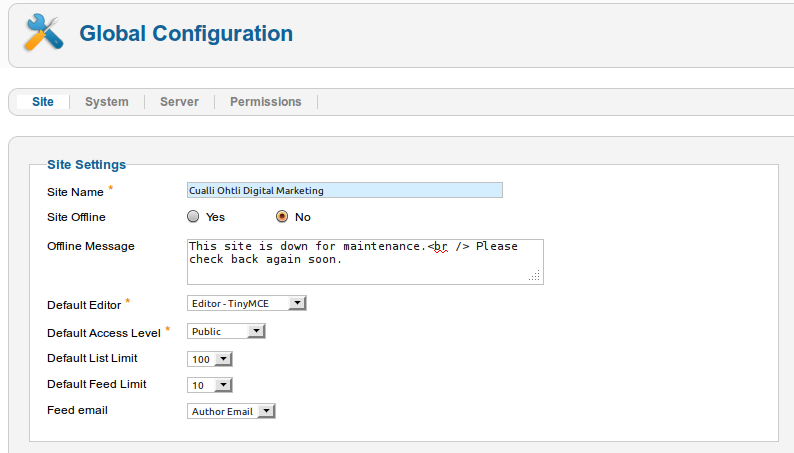
Go to Site -> Global Configuration and choose the Site sub menu/tab.

Change your editor* to “No Editor” in the Site Settings area on the “Default Editor” options.
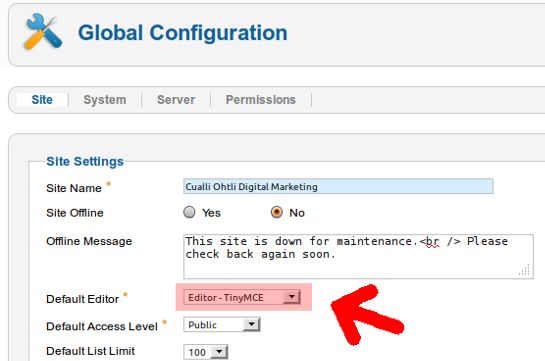
Joomla Dashboard

2. Changing the Article Manager Options

Using the administrator menu go to Content -> Article Manager.

On the top right corner of the screen, where the article manager icons are, click on the Options button.
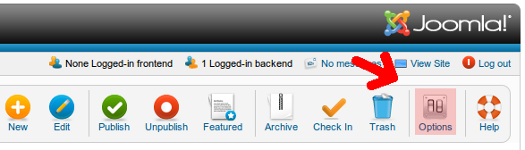
Joomla Article Options

3. Article Manager Options Screen in Joomla 1.7

A modal window will appear on screen with all the article options. click on the Text Filter tab. Once there, locate the “Super Users” or the users’ group you wish to grant the video embedding option and under Filter Type choose “No Filtering” and then click on Save & Close.
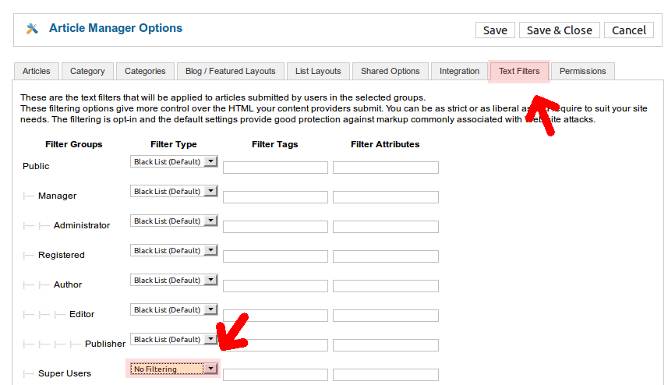
Joomla article manager options

Once this is done, it should be possible to add any code into any Article such as videos from Youtube with the regular embedding code.

This also works really well with the Artof Editor plugin.

Once you are done embedding the videos you can enable the filtering again (be careful not to open and save the articles with the video or they will be filtered again).

Tags: , , ,

9 Comments to “ Adding Youtube videos in Joomla 1.7 (clearing filters from editors) ”

  1. insignis on August 30, 2011 at 5:52 pm

    As mentioned in this video tutorial…

    http://learner.in/videos/viewvideo/141334/joomla/configuring-joomla-17-to-embed-youtube

    …you can also configure your editor (in TinyMCE, set Functionality to Extended) to allow you to insert the media. Just make sure you copy-paste the “old embed code” not the iframe code from YouTube and you’ll be in business.

    • Mario Canamar on September 2, 2011 at 12:32 pm

      Thanks insignis. I’m aware of that option, however, it only allows for the old embed code (using object) which is non-W3C compliant. Suggest you use the Artof Editor which is a CKEditor implementation and I find works cleaner in most instances and in this case, allows for use of the iframe which helps provide a better user experience on mobiles and all kinds of browsers.

  2. dante on September 2, 2011 at 2:32 am

    sa fonctionne pas se truc

    • Mario Canamar on September 2, 2011 at 12:10 pm

      It sure does… tested in several J1.6 and J1.7 sites. Care to provide details? Maybe I can help you fix your issue. This also works pretty well with the Artof Editor mentioned at the end of the article. Some people use the default WYSIWYG (TinyMCE) and restrict themselves to the non-W3C compliant Object embed method.

  3. SEO for fun | the Marketing stuff on September 5, 2011 at 5:25 pm

    [...] Search engine optimization is complicated and time consuming. There is no serious SEO who will tell you otherwise. Most serious SEO companies need to have a large team of programmers and SEO experts to provide proper services to their clients. [...]

  4. Sophie on September 5, 2011 at 5:33 pm

    Thanks, been looking for a solution to adding youtube videos in Joomla 1.6 for a while now!

  5. OmegaSpring on September 8, 2011 at 1:58 pm

    Good solution; besides you should never give super administrative level to any web user unless its really necessary, so filters are indeed a complete pain.

    Thanks for the tip.

    • Mario Canamar on September 8, 2011 at 5:49 pm

      That’s correct, super admin should be reserved for webmasters. In some instances were the super admin user is the final client and not a developer or webmaster, it is still a good idea to keep the filters on.

Leave a Comment